# Work Anniversary
### **1. Overview**
The Work Anniversary feature automatically celebrates employee milestones based on their date of joining by posting congratulatory messages on the Feed.
### **2. When to Use This?**
- To recognize employee loyalty and tenure
- To celebrate work milestones automatically
- To strengthen employee motivation and retention
- To reduce manual anniversary announcements
### **3. Concepts**
- **Work Anniversary Post**: An automated Feed post triggered based on the employee’s date of joining.
- **Celebration Bot**: Automatically publishes anniversary posts.
- **Backend Setup**: Anniversary messages and images are configured from Settings Centre.
### **4. Setup Guide (**Admin Setup**)**
##### Step 1: Ensure User Details Are Available
While creating or updating a user:
- Date of Joining must be entered
Without the date of joining, anniversary posts will not be triggered.
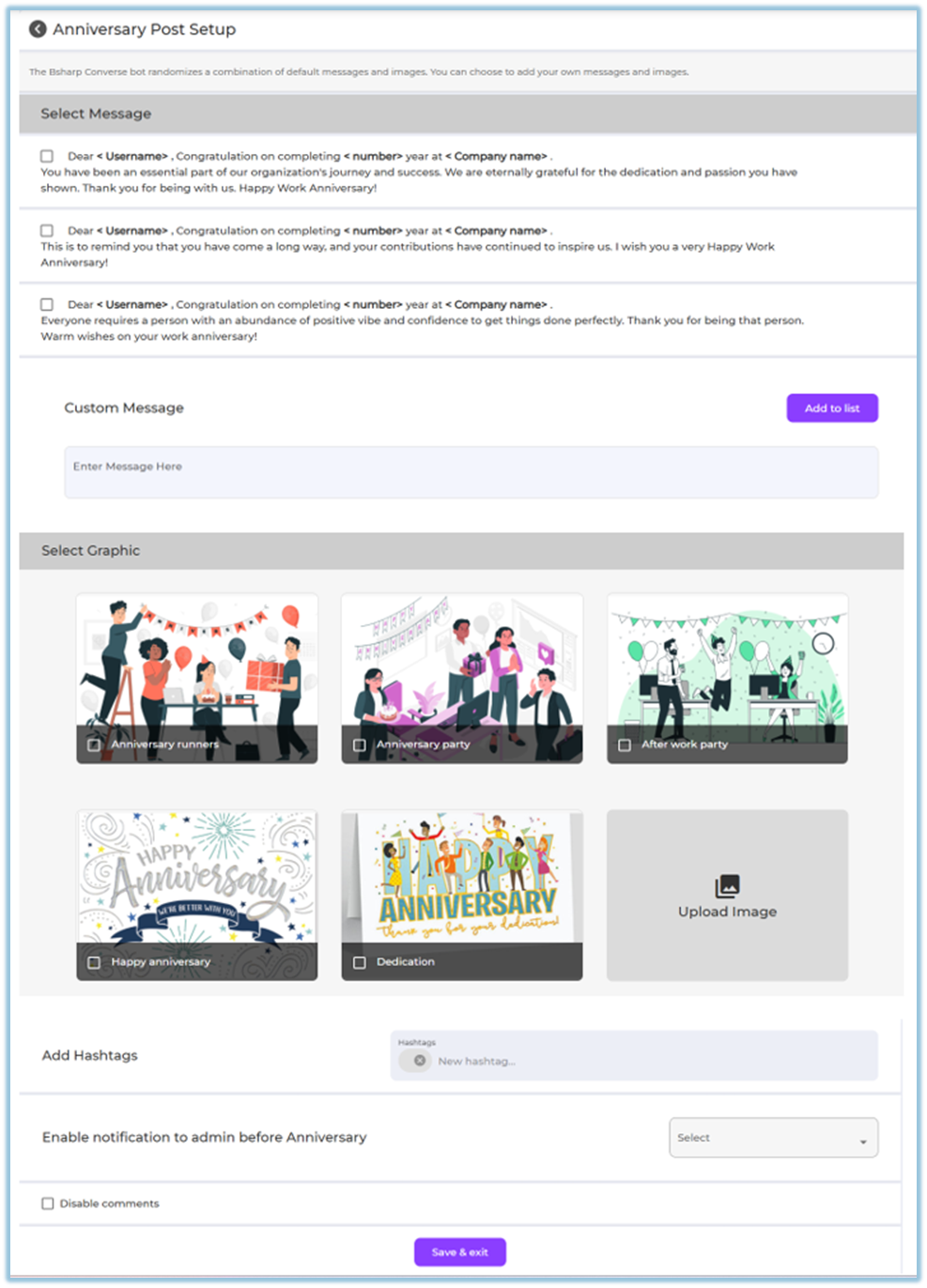
##### Step 2: Configure Work Anniversary Posts
1. Go to **Menu → Settings Centre** [https://converse.bsharpcorp.com/celebrate/settings\_center](https://converse.bsharpcorp.com/celebrate/settings_center)
2. Under **Engagement Setup**, click **Anniversaries** [https://converse.bsharpcorp.com/celebrate/anniversary\_setup](https://converse.bsharpcorp.com/celebrate/anniversary_setup)
3. Select one or more **default anniversary messages**
4. (Optional) Add a **custom message**
5. Select a **graphic/image**
- Or upload a custom image
6. (Optional) Add **hashtags**
7. (Optional) Enable **notification to admin before anniversary**
8. (Optional) Disable comments
9. Click **Save & Exit
**
### **5. User View**
- The anniversary post appears automatically in the **Feed**
- Posted by the **Celebration Bot**
- Displays:
- Personalized anniversary message (years completed)
- Selected image or graphic
- Reactions and comments (if enabled)

### **6. Reporting**
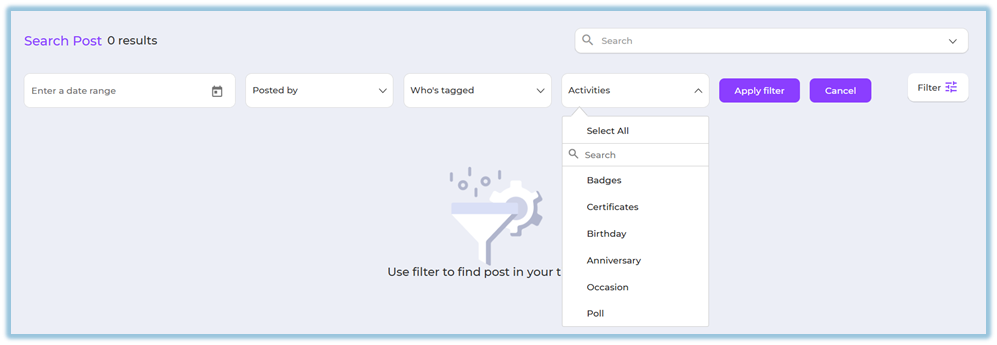
Work Anniversary posts can be tracked using Feed filters:
1. Go to **Feed**
2. Click **Filter**
3. Select **Activities → Anniversary**
4. Apply additional filters if needed
### **7. Best Practices & Tips**
- Ensure date of joining is correctly maintained
- Use appreciation-focused messages
- Enable comments to allow team congratulations
### **8. Troubleshooting / FAQs**
**Q: Can I edit a work anniversary post after publishing?**
No. Work anniversary posts cannot be edited once published.
**Q: Will the system calculate years automatically?**
Yes. The system calculates years based on the date of joining.
**Q: What happens if the date of joining is missing?**
The work anniversary post will not be created.
### **9. Related Links**
- [Feed – Posts](https://help.bsharpcorp.com/books/feed/page/post)
- [Settings Centre – Anniversaries](https://converse.bsharpcorp.com/celebrate/anniversary_setup)
### **10. Version Notes**
Last Updated: 24 Dec 2025